CKYC Upload Prerequisites
Before using the CKYC Upload APIs, your organisation must register with CERSAI (for Testbed/Production access) and set up integration access with HyperVerge for uploading CKYC batches. This section covers the end-to-end prerequisites required for a secure, automated upload workflow.
CERSAI Registration and Testbed Setup
CERSAI provides two environments for integration and testing: Testbed and Production.
Testbed Environment:
A sandbox setup for development, testing, and validation that mirrors the production environment without affecting live data enabling end-to-end testing, error identification, and workflow verification before moving to production.
Production Environment:
The live environment where real data and transactions occur. It should be used only after successful validation in the testbed, as any changes here directly impact end users and operational systems.
Register your Organization as a Financial Institution (FI)
The first prerequisite is to register your organization as a Financial Institution (FI) on the CERSAI portal and obtain access to the CKYC Testbed Environment.
Refer to the CERSAI CKYC Integration and Testing Guide for detailed steps on:
- Registration and environment access
- Testbed setup and testing checklist
- Maker–Checker validation process
- Submission and approval procedure
Once testing is successfully completed and approval is granted by CERSAI, your organization will receive:
- CKYC login credentials for Admin and Co-Admin users
- CKYC institution code and virtual account number (VAN) are sent to the nodal officer’s registered email ID
- Confirmation email from CERSAI
This process typically takes between 10 days to 1 month, depending on documentation completeness and CERSAI’s review timelines.
For more details, refer to the following official CERSAI documents:
CKYC Integration Requirements
Before integrating with CKYC APIs, complete a few prerequisites to enable secure and automated CKYC uploads.
IP Whitelisting and SFTP Setup
To enable CKYC Uploads, your organization must set up the following:
-
IP Whitelisting
Environment Action Required Testbed Kindly contact HyperVerge to provide the UAT IP that needs to be whitelisted on the CERSAI testbed environment. Production Kindly contact HyperVerge to provide the Production IP that needs to be whitelisted on the live CKYC environment. -
SFTP Access
CERSAI provides SFTP credentials for secure file-based interactions, including bulk uploads.
Setting Up SFTP Access and IP Whitelisting
- Download and complete the “Request Form − Application Integration Services”
- Email the completed form to helpdesk@ckycindia.in. Separate forms must be submitted for the Testbed and Production credentials.
- Once approved, CERSAI will provide your SFTP credentials and confirm the whitelisted IPs
CKYC Portal User Setup
For upload and verification, you must create two admin users on the CKYC portal: Maker and Checker.
HyperVerge will access the Maker credentials to upload the batches to the CKYC Portal. The Admin/Checker from the Regulated Entity can see the list of bulk KYC records and can approve/reject a batch after reviewing the details of records in that file.
To approve/reject the uploaded KYC batch, Checker must follow the following steps:
- From the KYC Management menu, click the Bulk KYC Authorization link.
- You are redirected to the screen that lists all the bulk records pending for checker approval.
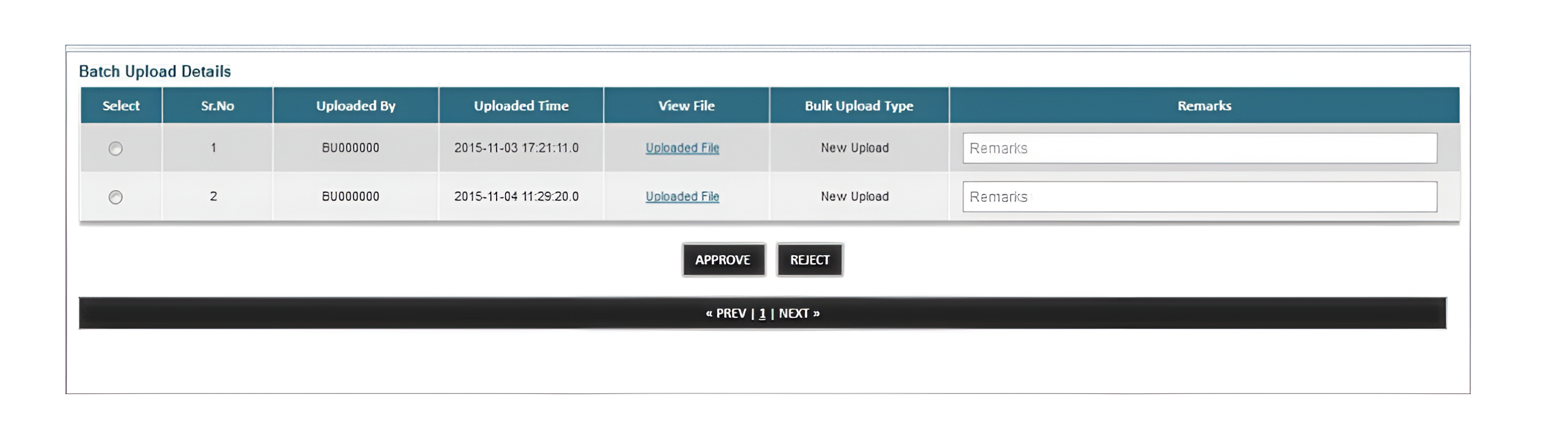
For further steps on approval and rejection of upload batch files, refer to the following resources:
| Resource | Description |
|---|---|
| SFTP System Design Specification | End-to-end guide for SFTP-based batch upload and checker approval |
| User Manual | Step-by-step portal usage guide |
| Deactivation User Manual | Guide for deactivating CKYC records |
Webhook URL Setup
To receive CERSAI success or error responses after each upload, you must set up a webhook endpoint.