CKYC APIs
Overview
Central KYC (CKYC) is a centralized repository maintained by CERSAI (Central Registry of Securitisation Asset Reconstruction and Security Interest of India). It stores KYC records for individuals and legal entities. Banks, NBFCs, insurers, and other Regulated Entities (REs) must access, validate, update, and upload customer KYC data to CERSAI.
Key Benefits
- Regulatory Alignment: Meets RBI, SEBI, and IRDAI compliance requirements.
- Operational Efficiency: Reuse verified records instead of re-collecting KYC data for each customer, cutting manual effort and cost.
- Data Integrity: A single source of truth reduces discrepancies and improves accuracy across systems.
- Faster Onboarding: Speeds up verification so customers move through account opening with fewer drop-offs.
- Reduced Compliance Risk: Standardized workflows lower the chance of regulatory violations and audit issues.
Supported Workflows
HyperVerge's CKYC Suite enables REs to integrate with CERSAI APIs across five workflows:
| Workflow | Description |
|---|---|
| Search & Download | Retrieve and download existing KYC records from CERSAI |
| Validation | Validate downloaded KYC data for accuracy and regulatory compliance |
| Upload | Upload new KYC records to CERSAI. Use the Update API for modifying existing records. |
| Conflict Resolution | Resolve data mismatches between client and CERSAI records |
HyperVerge's Search & Download solution uses a Docker image-based deployment model. The RE deploys and runs it on their own infrastructure, since CERSAI requires CKYC data to stay within the RE's systems. The remaining CKYC APIs, including Upload and Validation, are cloud-based solutions hosted by HyperVerge.
CKYC API Journey
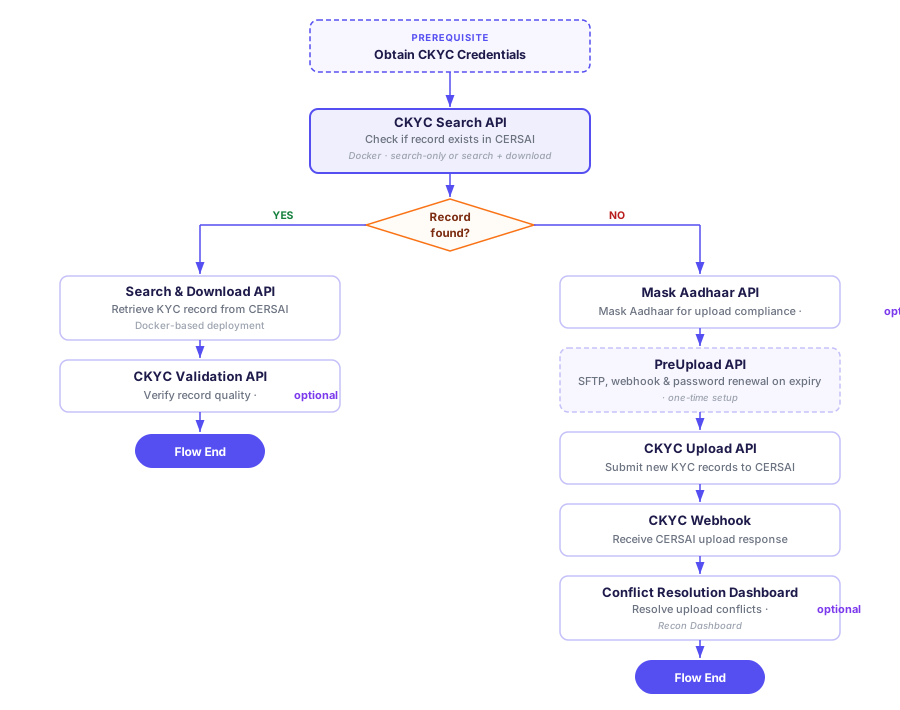
The following diagram shows how the APIs connect across a complete CKYC flow — from a one-time setup through search, download, validation, and upload to CERSAI.
Prerequisites: Obtaining CKYC Credentials
Before integrating with any CKYC API, REs must complete CERSAI's registration process to obtain live credentials. The process involves the following steps:
1. Submit CKYC Application Form (Live Environment)
Fill out the online form at www.ckycindia.in with FI and admin user details.
Output: Temporary Reference Number and a Testbed registration link sent via email.
2. Request CKYC Testbed Access
Submit an application at testbed.ckycindia.in.
Output: Testbed login credentials sent via email.
3. Perform Testbed Testing
Log in using testbed credentials and complete the following:
- Add a minimum of 5 dummy customer records with all required parameters.
- Complete maker-checker verification (validate input details and test upload, search, download, and update functionalities).
- Submit the testing completion checklist on the testbed portal.
Output: Submitted checklist on the testbed portal.
Download the official CKYC testing checklist: Testbed_Checklist_V1_3.pdf
4. Testing Approval
CKYC admin reviews the submitted checklist.
Output: Testing completion approval email, or reasons for rejection if applicable.
5. Send Physical Registration Documents
Prepare and send the following to the CERSAI Office, Delhi:
- Completed registration form
- Regulator license, PAN, and CIN
- Admin authorizations and ID proofs
- Testing approval printout
Track submission progress on the Live CKYC portal.
6. Document Verification by CERSAI
CERSAI verifies submitted documents for accuracy and completeness.
7. Receive Login Credentials
After approval, CKYC sends final login credentials to FI admins. The nodal officer receives the institution code and a welcome email.
The full registration and approval process typically takes 10 days to one month, depending on documentation completeness and CERSAI's review timelines.
CKYCR Registration Process
The following video walks through the CKYCR registration process:
CKYC APIs and Other Related Documentation
The following resources include CKYC APIs and related documentation (such as FAQs) for search, download, validation, and upload workflows:
| API Name | Description |
|---|---|
| Search and Download APIs | Search and download individual and legal entity CKYC records from CERSAI. |
| CKYC Validation API v2 | Validate downloaded CKYC documents for readability, accuracy, and alignment with CKYC XML data. |
| CKYC Validation API v1 | Validate CKYC records against user PII using a weighted scoring mechanism. |
| CKYC Upload APIs | Upload new or updated CKYC records and supporting documents to CERSAI. |
| Mask Aadhaar API | Mask Aadhaar numbers and associated QR codes in documents for privacy compliance. |
| CKYC FAQs | Frequently asked questions about CKYC operations. |